| Step | Do |
|
Let’s create the date_dim table using the default distribution style auto. This is a small static dimension table
|
Run the following table creation SQL in query editor
DROP TABLE IF EXISTS public.date_dim CASCADE;
CREATE TABLE public.date_dim
(
  d_date_sk             INTEGER NOT NULL,
  d_date_id             CHAR(16) NOT NULL,
  d_date                DATE,
  d_month_seq           INTEGER,
  d_week_seq            INTEGER,
  d_quarter_seq         INTEGER,
  d_year                INTEGER,
  d_dow                 INTEGER,
  d_moy                 INTEGER,
  d_dom                 INTEGER,
  d_qoy                 INTEGER,
  d_fy_year             INTEGER,
  d_fy_quarter_seq      INTEGER,
  d_fy_week_seq         INTEGER,
  d_day_name            CHAR(9),
  d_quarter_name        CHAR(6),
  d_holiday             CHAR(1),
  d_weekend             CHAR(1),
  d_following_holiday   CHAR(1),
  d_first_dom           INTEGER,
  d_last_dom            INTEGER,
  d_same_day_ly         INTEGER,
  d_same_day_lq         INTEGER,
  d_current_day         CHAR(1),
  d_current_week        CHAR(1),
  d_current_month       CHAR(1),
  d_current_quarter     CHAR(1),
  d_current_year        CHAR(1)
  )
;
|
|
Let’s create the customer address table using the distribution style key.
|
Run the following table creation SQL in query editor
DROP TABLE IF EXISTS public.customer_address CASCADE;

create table public.customer_address
(
 ca_address_sk int4 not null ,
  ca_address_id char(16) not null ,
  ca_street_number char(10) ,
  ca_street_name varchar(60) ,
  ca_street_type char(15) ,
  ca_suite_number char(10) ,
  ca_city varchar(60) ,
  ca_county varchar(30) ,
  ca_state char(2) ,
  ca_zip char(10) ,
  ca_country varchar(20) ,
  ca_gmt_offset numeric(5,2) ,
  ca_location_type char(20)
) distkey(ca_address_sk);
|
|
Let’s create the customer table using the distribution style key.
|
Run the following table creation SQL in query editor
DROP TABLE IF EXISTS public.customer CASCADE;

create table public.customer
(
  c_customer_sk int4 not null ,
  c_customer_id char(16) not null ,
  c_current_cdemo_sk int4 ,
  c_current_hdemo_sk int4 ,
  c_current_addr_sk int4 ,
  c_first_shipto_date_sk int4 ,
  c_first_sales_date_sk int4 ,
  c_salutation char(10) ,
  c_first_name char(20) ,
  c_last_name char(30) ,
  c_preferred_cust_flag char(1) ,
  c_birth_day int4 ,
  c_birth_month int4 ,
  c_birth_year int4 ,
  c_birth_country varchar(20) ,
  c_login char(13) ,
  c_email_address char(50) ,
  c_last_review_date_sk int4
) distkey(c_customer_sk);
|
|
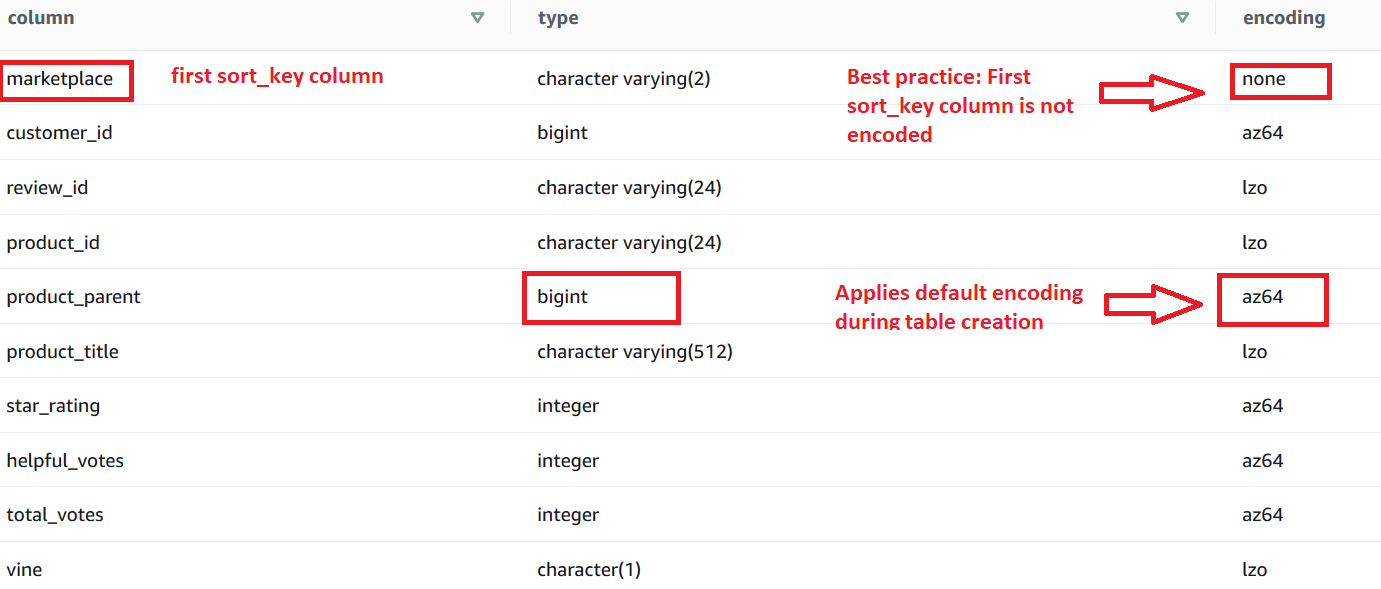
Create the product_reviews table with distribution style auto. We expect users to frequently filter on the columns marketplace and review_date, so we will make those the sort key columns for the table
|
Run the following table creation SQL in query editor
CREATE TABLE product_reviews
(
  marketplace varchar(2),
  customer_id bigint,
  review_id varchar(24),
  product_id varchar(24),
  product_parent bigint,
  product_title varchar(512),
  star_rating int,
  helpful_votes int,
  total_votes int,
  vine char(1),
  verified_purchASe char(1),
  review_headline varchar(256),
  review_body varchar(max),
  review_date date,
  year int,
  product_category varchar(32))
SORTKEY (
    marketplace,
    review_date);
|
Review the compression/encoding of the columns. Amazon Redshift automatically creates encoding of column using the performant AZ64 encoding for numeric, date, datetimestamp columns and lzo for char and varchar columns
|
Run the following SQL in query editor
SELECT "column", type, encoding FROM pg_table_def
WHERE tablename = 'product_reviews';
|
You will see the following output.